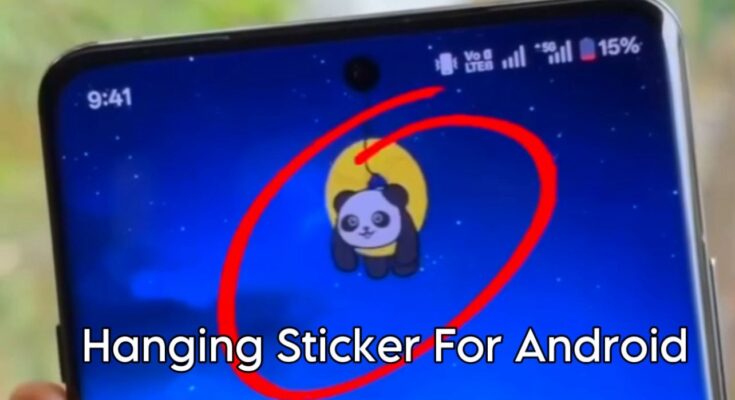
How to Add Hanging Stickers on Your Mobile Screen
Hanging stickers are a trendy way to decorate your mobile screen. These stickers appear like small emojis, cute characters, or objects hanging from the top of your screen, giving your phone a cool and stylish look. The best part is that you can add them easily using mobile apps, without needing any technical skills.
What Are Hanging Stickers?
Hanging stickers are special animated or static designs that stay on the edges of your mobile screen, mostly at the top. They look like decorations hanging down and sometimes move slightly when you touch the screen or open different apps. This makes your phone look more fun and attractive.
Requirements to Add Hanging Stickers
To use hanging stickers on your mobile phone, you will need:
- A smartphone (Android or iPhone)
- Internet connection
- A hanging sticker app from Play Store or App Store
- Permission to display over other apps
No Root or Special Settings Needed
You don’t need to root your phone or change any complicated settings. Hanging sticker apps work easily on normal smartphones.
Step 1: Install a Hanging Sticker App
First,
open the Google Play Store on your mobile phone.
- Now search using these keywords:
- Hanging stickers on screen
- Edge stickers app
- Screen decoration app
After searching, choose any app with high ratings and positive reviews and download it. Make sure to select a trusted app for better performance and safety.
Step 2: Open the App and Allow Required Permissions
After the installation is complete, open the hanging sticker app. When the app asks for permissions, allow them. These usually include permission to display over other apps, which is important for showing stickers on your screen.
Without granting these permissions, the stickers will not appear properly.
Step 3: Choose Your Favorite Hanging Stickers
Once you enter the app, you will see different hanging sticker options. Browse through the collection and select the stickers you like the most to decorate your screen.
- Explore different hanging sticker styles available in the app
- Pick your favorite designs such as chains, emojis, cartoon characters, or decorative items
- Select the Top Screen or Hanging Mode option
You can also preview the sticker to see how it will look on your screen before applying it.
Step 4: Customize Position and Size
Now adjust the sticker according to your choice:
- Change the sticker size (small, medium, or large)
- Set the position (left side, center, or right side)
- Adjust transparency level or animation speed
These settings help the sticker match perfectly with your phone wallpaper.
Step 5: Apply and Start Using
After completing all adjustments:
- Tap on Apply or Enable
- Close the app
- The hanging sticker will instantly appear on your mobile screen
The sticker will stay visible on your home screen and while using other apps.
Tips for Better Experience
- Use bright stickers on dark wallpapers for better visibility
- Avoid adding too many stickers to keep your screen clean
- Choose stickers that use less battery power
- Disable stickers while playing games for smooth performance
Final Thoughts
Adding hanging stickers to your mobile screen is an easy and fun way to customize your phone. With just one app and a few simple steps, you can give your device a stylish, fresh, and creative look.